
Pretty bold title, uh?
Before I even begin, let me say two things. First, this is a pretty obvious use for the new Flash 10 drawing API, so I’m quite sure somebody has created something similar already, specially because it’s something I can see a lot of people in need of. Second, please read the entire post before commenting, because it may not be exactly what you think it is.
So getting straight to the point, I’ve created a drawPlane function that uses the new drawTriangle() method in Flash 10’s ActionScript 3 native APIs to draw a correctly distorted plane in 3d, based in four bidimensional points. Other people would call it distortImage or something similar. Click below to check an example:

By now, you’re probably thinking, “hey, I’ve seen this before”. There’s this, this, this, this, and probably many others. So why another one?
Well, there’s one special (and blunt) reason why: because they’re all wrong.
Here’s a shitty image I created a few years ago to illustrate my point:
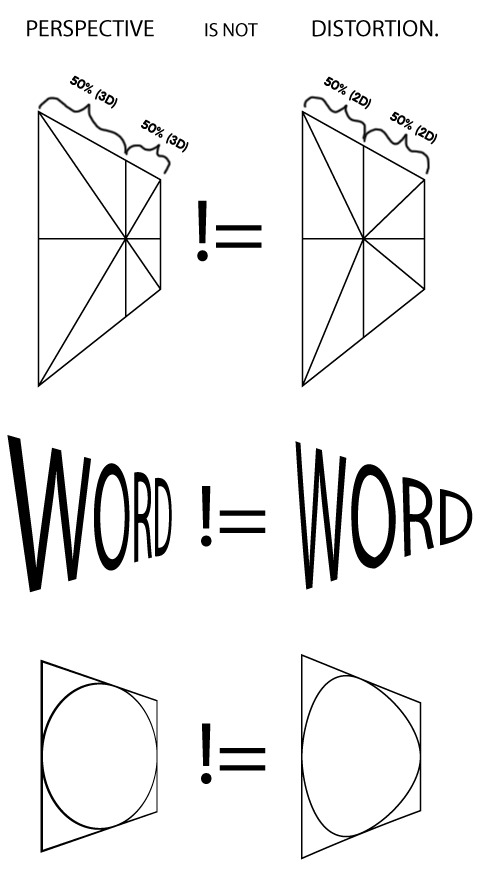
Subdividing a plane into a bunch of triangles using their bi-dimensional distances doesn’t give you a projected plane. It gives you a good approximation, and I guess the calculation is easier, but try distorting a plane like that by any amount and you’ll see what kind of deformity it generates.
Secondary to that, I wanted to use the new Flash 10 capabilities to project planes without a lot of hassle (meaning, without having to rely on other libraries or actual 3d position) and, most importantly, by using two triangles only for the entire plane – with no subdivisions of any kind.
Now, don’t get me wrong. There were reasons for (correct) triangulation before Flash 10: Bitmap fills had to rely on a non-distorted fill, so adding more triangles created more accurate results. However, Flash 10 allows AS3 developers to set the distortion factor of a Bitmap fill by using the new drawTriangle() method and its UVT parameters, achieving just that – a perfectly projected plane using two triangles only.
But here lies another problem. While finding the projection is pretty trivial if you’re working with three dimensions (the T portion of the of UVT combination is just a function of the Z of each point), things get a bit more confusing when you’re dealing with points set in two dimensions – points defined by their X and Y only. And that’s exactly what I was going to need, since this is all supposed to be used in a project I’m creating at Firstborn where we’ll be combining video renders with Flash-drawn content over the video at specific positions, and I don’t have any kind of 3d information about the points, just anchor points matched to the video. To put it another way, I wanted to have the same ability to move corners as you have in Photoshop’s Free Transform tool.
I honestly could not find an answer to the problem online. I’m pretty sure there’s some complex way that makes a lot of sense to project 2d points into a 3d field, and therefore find the T of each point, but instead, I was lucky enough to get what I wanted working after a good amount of crazy trial and error (and beer). It actually made the solution very small and much simpler than I expected.
So without further ado, here’s the actual implementation. It’s a pretty simple method that draws a BitmapData to a Graphics instance and sets the perspective accordingly. The semi-secret is the weird diagonals-based ratio that’s calculated for each corner, giving the final plane render uncanny precision.
package com.zehfernando.display {
	import flash.display.BitmapData;
	import flash.display.Graphics;
	import flash.geom.Point;
	/**
	 * @author zeh
	 */
	public function drawPlane(graphics:Graphics, bitmap:BitmapData, p1:Point, p2:Point, p3:Point, p4:Point) : void {
		var pc:Point = getIntersection(p1, p4, p2, p3); // Central point

		// If no intersection between two diagonals, doesn't draw anything
		if (!Boolean(pc)) return;

		// Lengths of first diagonal
		var ll1:Number = Point.distance(p1, pc);
		var ll2:Number = Point.distance(pc, p4);

		// Lengths of second diagonal
		var lr1:Number = Point.distance(p2, pc);
		var lr2:Number = Point.distance(pc, p3);

		// Ratio between diagonals
		var f:Number = (ll1 + ll2) / (lr1 + lr2);

		// Draws the triangle
		graphics.clear();
		graphics.beginBitmapFill(bitmap, null, false, true);

		graphics.drawTriangles(
			Vector.<Number>([p1.x, p1.y, p2.x, p2.y, p3.x, p3.y, p4.x, p4.y]),
			Vector.<int>([0,1,2, 1,3,2]),
			Vector.<Number>([0,0,(1/ll2)*f, 1,0,(1/lr2), 0,1,(1/lr1), 1,1,(1/ll1)*f]) // Magic
		);
	}
}

import flash.geom.Point;
function getIntersection(p1:Point, p2:Point, p3:Point, p4:Point): Point {
	// Returns a point containing the intersection between two lines
	// http://keith-hair.net/blog/2008/08/04/find-intersection-point-of-two-lines-in-as3/
	// http://www.gamedev.pastebin.com/f49a054c1

	var a1:Number = p2.y - p1.y;
	var b1:Number = p1.x - p2.x;
	var a2:Number = p4.y - p3.y;
	var b2:Number = p3.x - p4.x;

	var denom:Number = a1 * b2 - a2 * b1;
	if (denom == 0) return null;

	var c1:Number = p2.x * p1.y - p1.x * p2.y;
	var c2:Number = p4.x * p3.y - p3.x * p4.y;

	var p:Point = new Point((b1 * c2 - b2 * c1)/denom, (a2 * c1 - a1 * c2)/denom);

	if (Point.distance(p, p2) > Point.distance(p1, p2)) return null;
	if (Point.distance(p, p1) > Point.distance(p1, p2)) return null;
	if (Point.distance(p, p4) > Point.distance(p3, p4)) return null;
	if (Point.distance(p, p3) > Point.distance(p3, p4)) return null;

	return p;
}
Inside a DisplayObject, use it like so to redraw a BitmapData instance using 4 given 2d points:
drawPlane(this.graphics, myBitmapData, topLeft, topRight, bottomLeft, bottomRight);
You can download the source for the example editor above from here: TriangleTest.zip. Warning: it’s a Flash 10, AS3 classes-only example. There’s no FLA file and no project settings file. The structure should be fairly simple to understand, however; the class roots are at /src/src (actual source) and /src/libs (a few additional files used). Just compile /src/src/documents/TriangleTest.as as your document class and you should be good to go.
Anyway, I like it. It can probably be a bit optimized (specially the getIntersection function, or the many Point.distance() calls) but it works well so far – don’t forget it’s only dealing with 4 points per plane, so there’s no excruciating loop that begs for optimization.
If you still think this was done before – Flash 10 drawTriangles() based image drawing, with two triangles, and correct perspective distortion – please post a link on the comments and I’ll correct the article. I still think the title and the premise of the post is bold, but so far, I’m sticking to it.
Finally, do notice that this is not a 3d engine. It’s just a quick way to draw a plane when you only know the 2d points of the corners. There are no 3d points, vertices, or angles of any kind involved here. If you want to rotate a plane you already have, it makes a lot more sense to just rotate it using the native rotation properties, or use any 3d engine of your preference.
PS. No, the cat is not mine. It’s Don Citarella‘s Floyd.
Update: makc used the same approach to do the inverse: get a projected plane out of a 3d graphic and transform it on an de-projected rectangle, something that seems to have the amazing name of inverse homography. Read about it here, and see an example of the technique here. Apparently this is a faster alternative to the same technique first employed by Japanese rock-star Flash developer Saqoosha.

> There are no 3d points, vertices, or angles of any kind involved here
you’re wrong, as long as you calculate T values, it is 3D. you could basically write a code that draws a 3D cube on top of this, in the way FLARToolKit does, for example.
Semantics? I’m not calculating the T based on any Z, but rather based on the proportion of the diagonals. What I meant by ‘no 3d points/vertices/angles’ is that no xyz combination is ever used, nor any angle, nor any sin/cos/etc calculation, so I’d hardly call it ‘3d’. I didn’t write it to sound like “look mom, no 3d!”, but rather as in “look, this is not specially clever as there’s no 3d, it’s just a hack/shortcut that happened to work”.
That’s really nice, the perspective is perfect!!
No I mean given T = focalLength/(focalLength + z) there is no difference, it _IS_ 3D no matter what, and your tricky “2D” math is actually equivalent to solving true 3D equations.
p.s.just to clarify, this is to say you should not underestimate the coolness of this code 🙂
makc is right (hello makc :D).
It’s not called *perspective* correction for no reason! But it’s a good article anyway.
Well, yeah, in the end the result *is* 3d/perspective, I just didn’t use the normal approach 🙂
Thanks.
more cats? more cats.
Holy shit — the Japanese beat me to it not only in making the correct plane projection, but in also using cats when doing so. Typical.Oh wait, that’s my code there. WHEW! I can stop crying now.
Floyd informs me that while it may appear 3D to us humans, it is still quite elementary compared to his 3D. Also, he would like the phone number of makc’s “slender, black Japanese mama” on the bottom left. His words.
Don’t be silly, cats don’t use phones. They are on twitter.
…they are @ann_catalog and @rena_catalog.
amazing work! good job!
I recently need this function in a haXe project, so I’ve make a haXe port of your code.
I put it here, just in case anyone need it 🙂
http://gist.github.com/361166
It’s me again 😛
I’m wondering if there is a way to reverse the process?
That is there is a perspective distorted plane drawn on a BitmapData, we use the drawTriangles method to draw undistorted plane.
Any idea?
Btw, Zeh, your method might no longer really be the “best ever”, check http://wonderfl.net/c/sxQJ (that simply sets transform.matrix3D on image (or video (or swf))).
Hey makc – great, thanks for the link! Indeed, the solution seems to be similar, but making a real matrix3d projection as opposed to constant drawtriangles painting would be much better (for interactivity and such). Nice find!
Nice. I’m trying to create something which starts with an equilateral and then when you move any of the points it stretches the content to create perspective – could this technique be modified for a shape with three points instead of 4?
Thanks man, I too was rather annoyed that none had already made a simple transform tool with this capability, matrix transformations just don’t do this 🙁 The thought of starting my crud tool from scratch was making my head hurt, now thanks to this I have the core already 🙂
Hi, Zeh!
Nice work! I used you solution as a quick-fix for my graduation project, but then I decided to use homographies. In fact, the results are the same.
Now I’m trying to make the same thing on HTML5 Canvas. But this damned thing has no UVT mapping, and all I can do for the moment is ugly affine texture mapping. I know that the problem can be solved in WebGL, but I’m not permitted to use it right now, HTML5 only.
http://www.w3schools.com/tags/canvas_transform.asp here is the description of transforms. If I could only use the 9 params instead of 6, I will solve my problem. Do you know the tricks that can help?
Hey Pehat, not sure you have seen this, but have you tried using CSS Matrix3d? Not sure if that’s what you want since you’re using canvas, but it may help. Other than that I don’t have that much information on HTML drawing… my canvas knowledge is pretty basic.